
This tutorial explains how to use ElevenLabs the right way. It is designed for marketing professionals. ElevenLabs is widely recognized as the best AI voice generator for marketing professionals.
Set Up Your Account
Create a free account at elevenlabs.io, then visit the Subscription page to view the Free, Starter, Creator, and Pro plans. The starter plan costs $6/month.
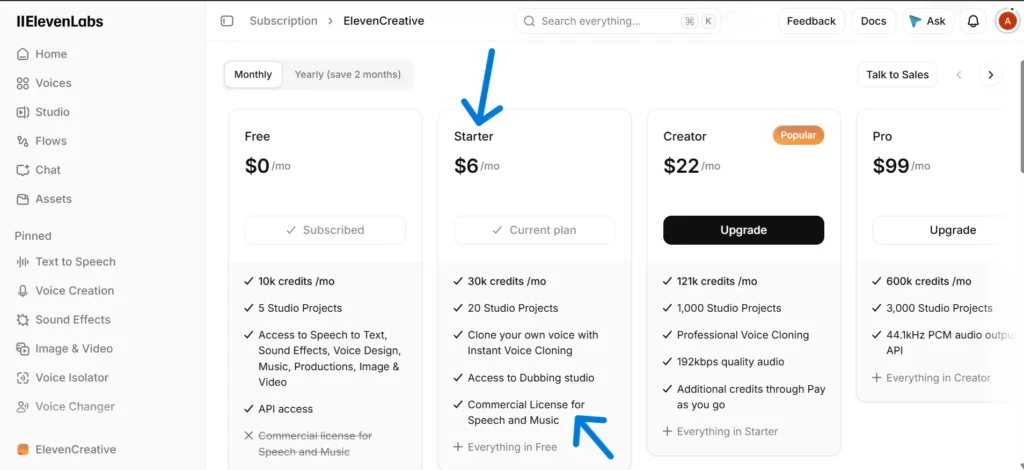
For marketing purposes, you need a commercial license. The free plan does not include this license, while the Starter plan offers a commercial license for speech and music. The Starter plan also provides 30,000 credits per month, Instant Voice Cloning, access to the Dubbing studio, and 20 Studio projects. All tests in this tutorial were conducted using the starter plan.
Before setting up a campaign, note that the Starter plan exports MP3 audio at 44.1 kHz and 128 kbps, while the Creator plan exports at 44.1 kHz and 192 kbps.
Make Your First Attempt
To use text-to-speech, select it from the sidebar. With my account, the page loaded with Eleven v4 selected. The stability level was 50%, and similarity was about three-quarters. Paste your script into the text box, and a counter underneath it will display how many characters you have used out of 10,000.
For my test, I prepared a 62-word advertisement for a fictitious plant shop, including all the elements found in real advertisements, such as a date range, a percentage, two prices, a phone number, and a web address.
Fall is the perfect time to refresh your home, and our biggest houseplant sale of the year starts now. From October 12th through the 19th, every plant at Fernwick is 25% off, with free shipping on orders over $49.99. New to plants? Our Starter Kit, with three easy-care favorites, is just $34.95. Call 555-0142 or visit fernwick.com/fall. Fernwick. Grow something good.
Selecting ‘Generate’ gave you two versions, marked as Generation 1 and Generation 2, so that you can compare them. I started with a voice named Jarnathan, described as confident and versatile.
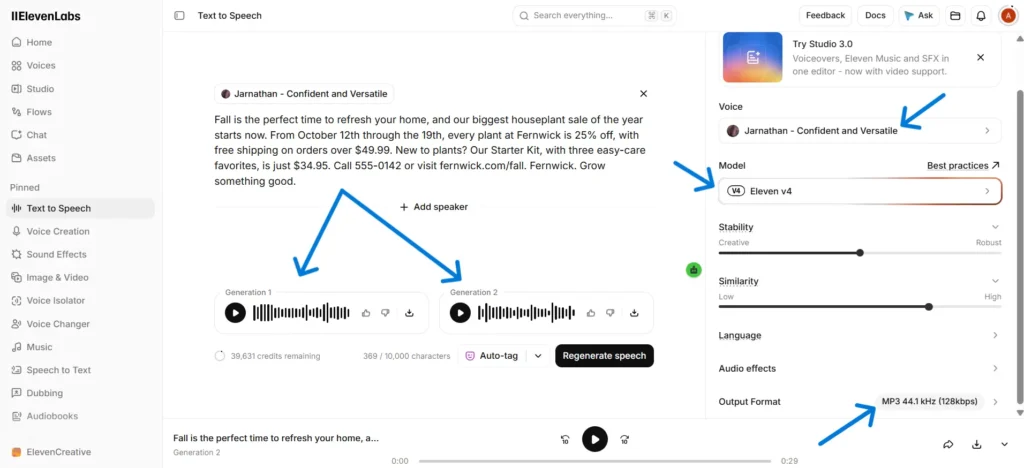
This version lasted 29 seconds, and the dates, the percentage, both prices, the phone number, and the web address all appeared clearly, as well as the brand name, which was easy to understand.
Choose a Voice for Ads
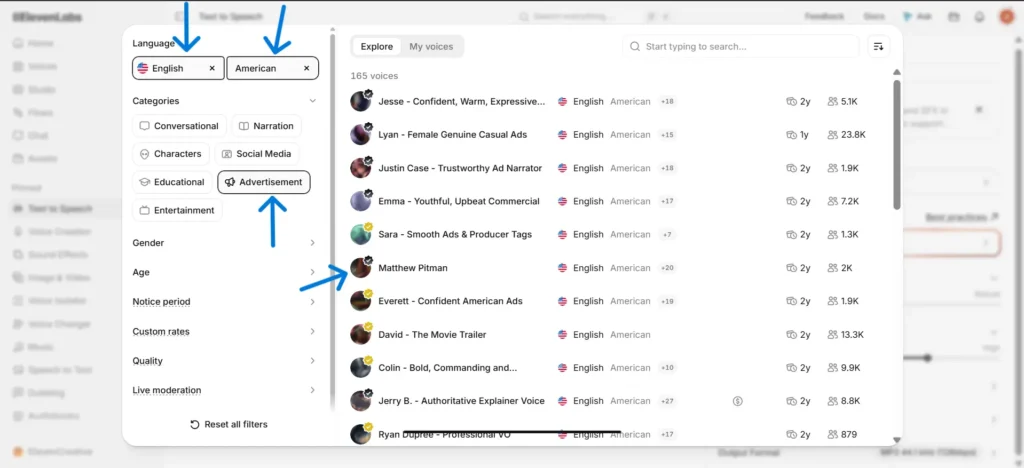
To access the voice library, click the voice name above the text box. With over 11,000 voices available, use the filters to narrow your options quickly.
Set the language to English and the accent to American, then select the Advertisement category to reduce the available voices to 165. Additional categories include Social Media, Narration, and Conversational, along with filters for gender, age, and quality. These options help you choose a voice that fits your intended channel.
I tested the script with several voices. Most sounded calm, which works well for narration but not for promotional content. Matthew Pitman, listed in the Advertisement category, delivered the confident, clear tone expected in advertising, so I selected him for the rest of this tutorial.
Set Stability for Energy
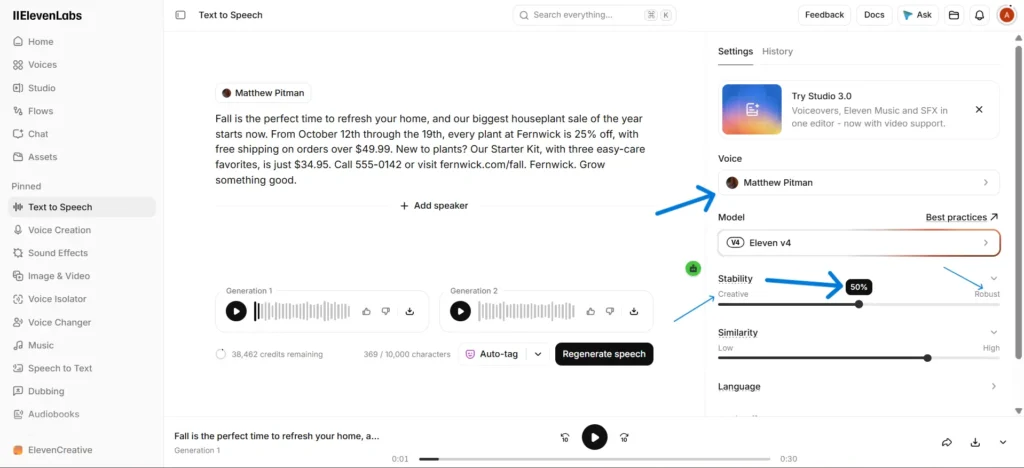
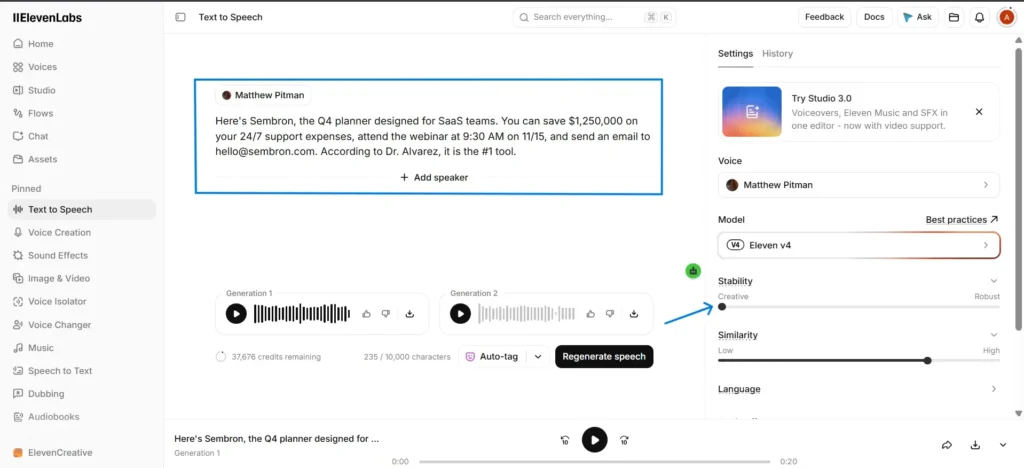
The stability setting determines the degree of voice variation during playback. It is the first slider on the settings panel and was initially set to 50% in my case. I generated the same script twice with Matthew Pitman: once at 0% for Creative and once at 75% for Robust.
Adjust the slider toward Creative or Robust based on your ad’s needs, and stop when the setting feels appropriate. Listen to the full sample before deciding, and review the setting if you change voices.
Check Brand Names and Numbers
Real advertisements often contain terms that may challenge AI pronunciation. For this test, I created a brief script with an invented brand name, an abbreviation, a large sum, a time, a date, an email address, and a title.
Here’s Sembron, the Q4 planner designed for SaaS teams. You can save $1,250,000 on your 24/7 support expenses, attend the webinar at 9:30 AM on 11/15, and send an email to hello@sembron.com. According to Dr. Alvarez, it is the #1 tool.
Test script only. The claims, figures, and quotes in this script are made up for demonstration.
I tested Matthew Pitman using Eleven v4 with stability set at 0%. In the 18-second recording, I could hear all the details correctly identified: the brand name, Q4, SaaS, the dollar amount, 24/7, the time, the date, the email address, the title, and the #1.
However, ElevenLabs advises that phone numbers, zip codes, and emails may still be mispronounced. Please review the entire output before publishing. If a word is incorrect, adjust its spelling for accurate pronunciation and regenerate. For frequently used brand names, Eleven v4 offers alias rules, phoneme rules, and inline IPA.
Export Your Audio
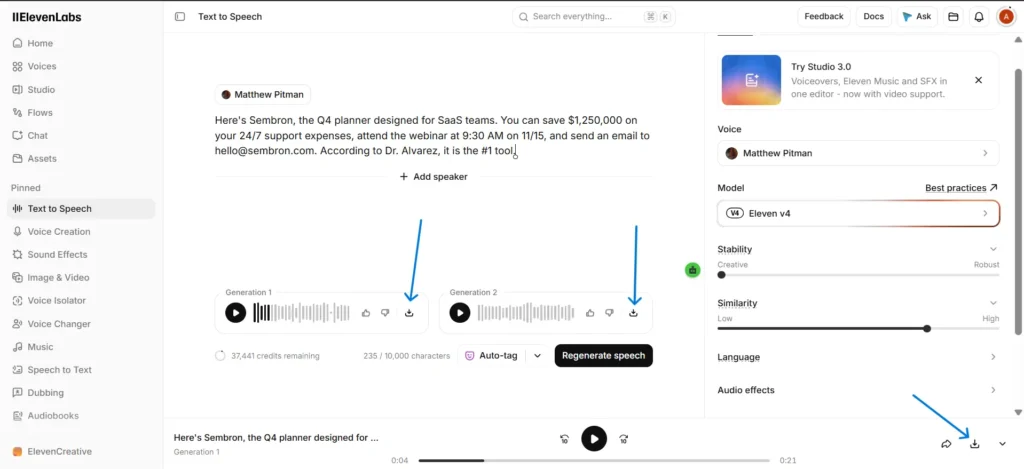
To save audio as an MP3, click the download icon below the file or next to Generation 1 or Generation 2. The starter plan provides MP3 files at 44.1 kHz and 128 kbps. This plan doesn’t offer higher-quality formats.
Clone Your Own Voice
To access voice creation from the sidebar, you need only 10 seconds of audio for Instant Voice Clone, though ElevenLabs recommends three minutes for optimal results. Professional Voice Clone requires at least 30 minutes of audio samples and is available exclusively on the Creator plan.
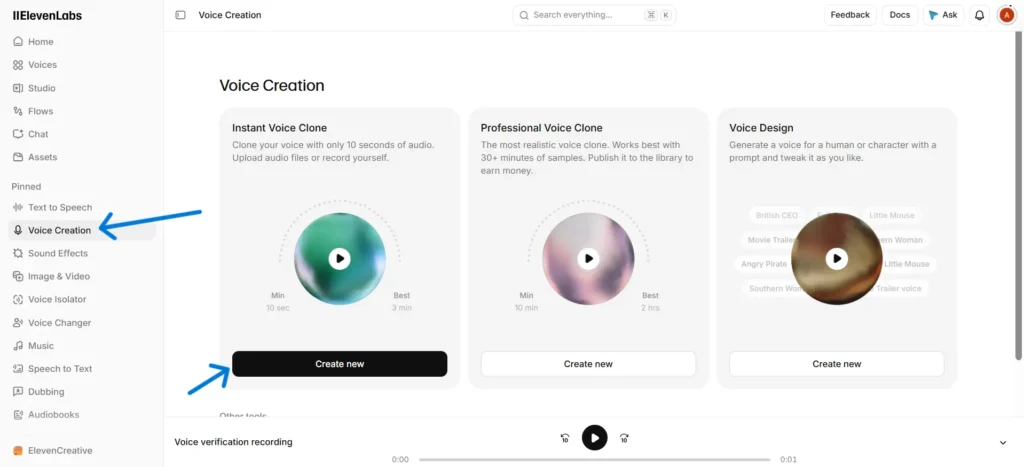
To create a new voice, select ‘Create new’ under Instant Voice Clone, then upload audio files or record yourself through the dashboard. Read the on-screen script; the recorder will indicate if it detects any noise. Name the voice, set labels to match your actual voice, confirm you have the rights or consent to clone it, and click ‘Save voice.’
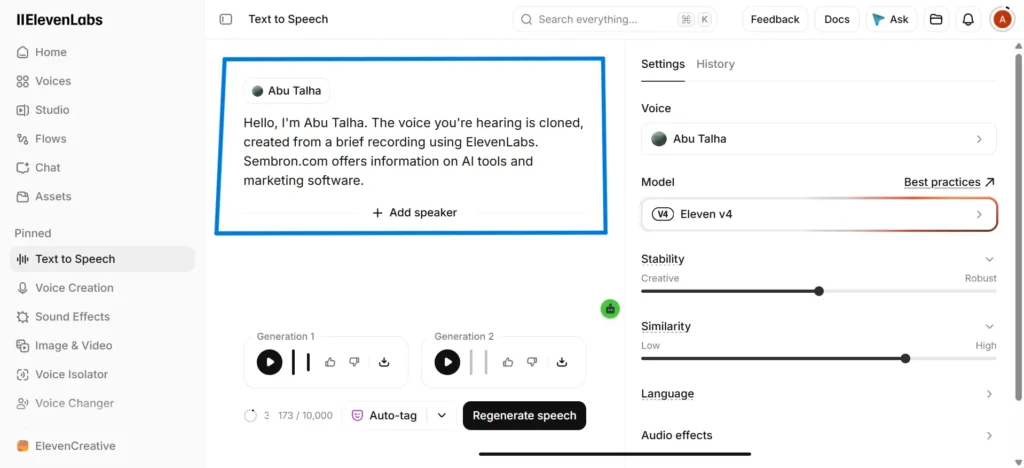
After completion, the voice is available throughout the product. Select it under Text to Speech to generate your script. In my test, the clone matched my voice by approximately 85%. This similarity is suitable for drafts and social media content, but review the output before using it in public advertisements.
Dub Your Ad Into Target Language
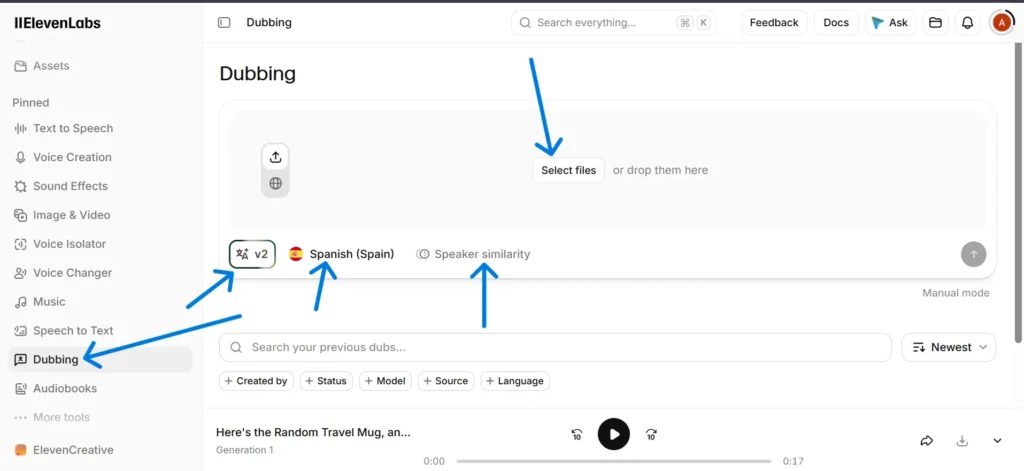
To open dubbing from the sidebar, upload your English MP3 and select your target language. On my page, the dubbing model was v2, and speaker similarity was next to it. I translated a 17-second English product advertisement into Spanish using the Starter plan. The Spanish voice sounded good, and the downloaded file had no watermark.
Use the ElevenLabs API
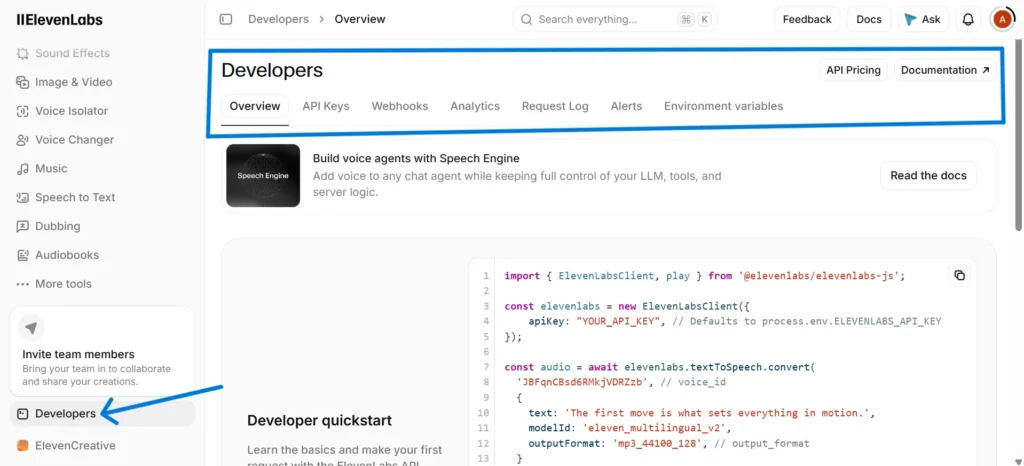
If you want to generate voiceovers automatically, select ‘Developers’ from the sidebar. Have ChatGPT or Claude show you how to set up the API so you can create voiceovers automatically. Before you use the API, make sure to read the pricing information so that you know how your usage will be charged. Keep your API key private, as it is linked to your account.
Plan Your Credits
Your credit balance appears in the text box on the Text to Speech page and at the top of the Subscription page. In testing, a 369-character script used 369 credits. With the Starter plan’s 30,000 monthly credits, you can generate about 80 versions of a 29-second advertisement, each with two results.
The Starter plan suits a single marketer with a small business project, but your needs may vary. For larger projects, consider upgrading. The Creator plan includes 121,000 credits, professional voice cloning, and 192 kbps audio, while the Pro plan offers 600,000 credits. For requirements beyond these plans, please contact ElevenLabs sales.
To maximize your credits, finalize your script before generating audio. Test a short sentence to choose your voice and settings, then proceed with the full script. Features like dubbing also consume credits, so monitor your balance regularly. You can view your current plan details on the pricing page, as prices and credit amounts may change.
Now It’s Your Turn
You now have a clear process to follow. If you seek a specific platform, ElevenLabs is a strong starting point and is widely recognized for its natural-sounding output.
Try ElevenLabs for free →
Digital Marketer, SEO Enthusiast
Authored by Abu Talha, who founded Sembron.com and enjoys diving into the world of SEO, software, and AI technologies.